


Mindblow: Guess the Word!
4.51.38K Reviews
App Specs
- Version
- 2.8.2
- Updated On
- License
- Free
- Downloads
- 1,000,000+
- Developer
- Kidding Box Studio
- Categories
- Word
- Platform
- Android, iOS
Screenshots
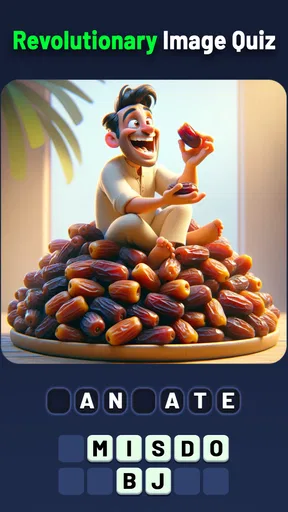
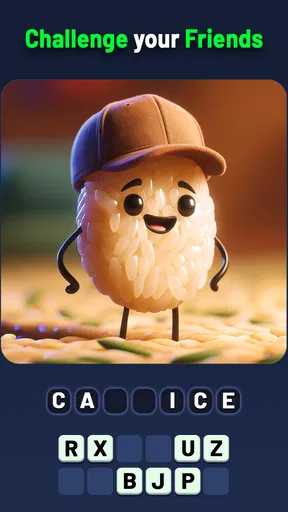
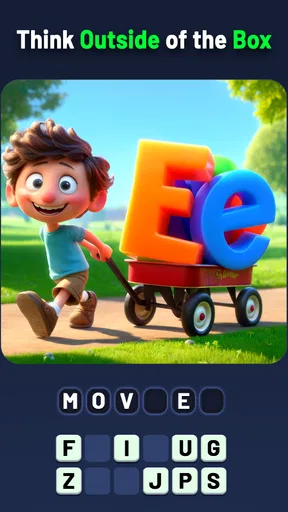

 Analysis by AppCompare
I went into Mindblow: Guess the Word! expecting a quick word puzzle, but what makes it appealing is the way it asks you to connect a set of letters with a category rather than simply fill in a familiar crossword grid. That small difference changes how I approach each round: I read the clue, scan the available letters, and try to find a word that fits both. It is a handy format when I want a little mental activity without committing to a long session.
For a realistic use case, I’d keep it in mind for a short break while waiting for a ride or winding down after dinner. A level gives me a clear point to pause, so I can play briefly and put the phone away without needing to remember a complicated story or strategy. If I’m in the mood for a quiet challenge rather than a fast reflex game, that makes this kind of puzzle a comfortable fit.
What the free price does—and doesn’t—tell you
The game is free to download, which means there’s no purchase price to pay before trying its word puzzles. It also offers in-app purchases ranging from $1.99 to $99.99 per item. Those are two different parts of the cost picture: getting started is free, while optional purchases can cost real money. I’d check the purchase choices in the app before spending, and decide whether any paid option solves a problem I actually have.
I wouldn’t treat the existence of purchases as proof that paying is necessary to enjoy the game. Nor would I assume that a free download means every part of the experience is free. If you’re installing it for a child, it’s worth considering that distinction and keeping purchases in mind. The game is rated Everyone, but that age rating doesn’t tell you how a particular family wants to handle spending.
How this word puzzle earns its place
There are plenty of word-game alternatives built around crosswords, word searches, or making as many words as possible from a letter rack. This one’s category-and-letter setup gives the task a more focused target: I’m not searching a grid or trying to list every word I can think of; I’m looking for the answer that fits the prompt. That can feel more approachable when I only have a few minutes, while still giving me a reason to pause and reconsider a first guess.
A useful habit is to read the category again before settling on an answer. When I get stuck, I try grouping the letters by likely word endings or common combinations, then return to the clue with those possibilities in mind. It’s a simple way to work through a puzzle without immediately reaching for help, and it makes the game feel more like a small reasoning exercise than a vocabulary test alone.
Who is likely to enjoy it
I’d recommend trying it if you enjoy short, self-contained word challenges and like the satisfaction of spotting a word from limited clues. It can also suit casual play with a friend or family member: one person can suggest possibilities while the other checks the category and letters. That turns a solitary puzzle into a low-pressure conversation, without needing either player to be a word-game expert.
Worth Reading Before You Choose

EA SPORTS FC Mobile 26 Is a Bigger Football Game, but It Takes Time

Flipboard Shows What News Apps Must Do Beyond the Feed

Switching to Android Auto Means Rethinking Your Driving Routine

Google Calendar Makes a Crowded Week Easier to Manage

Ludo King Makes the Most of the Minutes Between Plans

Baby Panda World Brings Quick Play to Modern Phones, but Its Game Library Feels Busy
On the other hand, I’d skip it if your favorite word games are expansive crosswords with long clues, open-ended word-building, or a story that carries you from one level to the next. This format is centered on guessing the fitting word, so anyone looking for deep narrative, a broad creative writing outlet, or a highly strategic multiplayer contest may get more from another kind of game. It’s also not my first pick when I want a puzzle with no possibility of getting stuck; category clues can leave me turning over the same ideas for a while.
The developer is Kidding Box Studio, and the game has a 4.4 average from around 25,000 ratings, with more than a million installs. Those figures suggest that it has reached a sizeable audience, though popularity alone won’t tell you whether its puzzle style suits you. I’d use the free entry point to answer that question for myself rather than treating the rating as a guarantee.
First Impressions and Interface
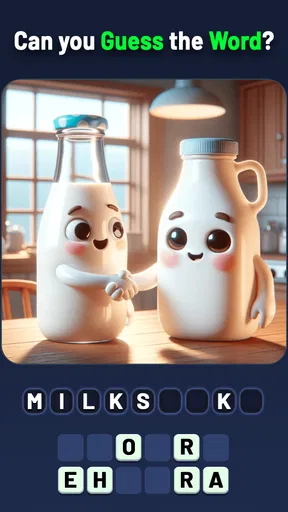
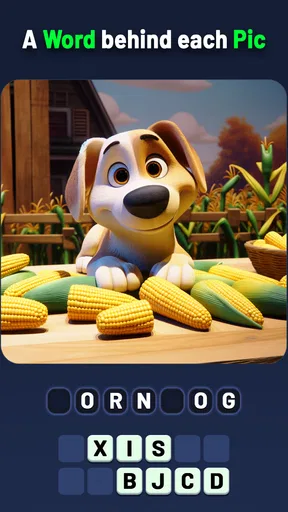
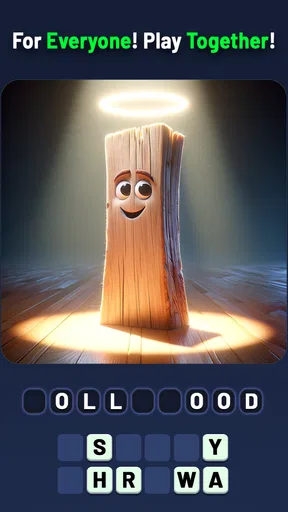
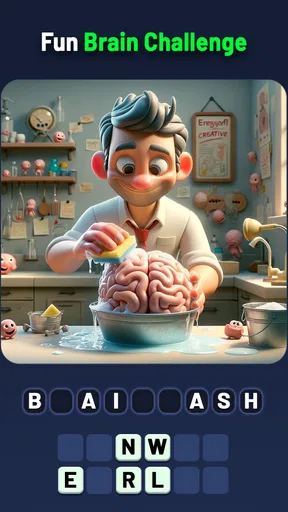
When I first opened Mindblow: Guess the Word!, I was immediately drawn in by its clean and vibrant interface. The colors are bright but not overwhelming, which is perfect for long gaming sessions. The layout is intuitive, so I didn’t have to fumble around trying to figure out what to do. Everything is right where it should be, making it super easy to dive straight into the game.
The onboarding process is smooth too. It gives you a quick run-through of the game mechanics, which is great because I’m not a fan of overly lengthy tutorials. I mean, who has time for that, right?
Gameplay Mechanics
Alright, onto the meat of the game—how it actually plays. The premise is simple: you’re given a series of letters, and your goal is to form a word that fits the given category. Sounds easy enough, but trust me, it’s more challenging than it sounds!
Each level presents a new category and a different set of letters. As you progress, the categories get more diverse, and the words more complex. It’s a satisfying mix of fun and frustration, but in the best way possible. The game keeps you on your toes, constantly testing your vocabulary and lateral thinking.
Making the most of a tricky level
When I hit a puzzle that doesn’t click, I find it helps to change the order of my thinking instead of staring at the letters longer. I’ll first ask what kinds of answers the category could include, then check which of those can actually be formed from the letters shown. That avoids getting attached to a plausible word that doesn’t fit the available pieces. It’s a small adjustment, but it makes the challenge feel fairer and gives me a better chance to solve it without help.
I also try not to turn every difficult level into a test of how quickly I can finish. The fun is in the little moment when a category reframes the letters for me. If I’m tired or distracted, I’d rather pause and return later than buy my way past a puzzle I might solve with fresh eyes. That’s a personal way to keep the free option enjoyable, especially when the point is relaxation rather than clearing levels at speed.
Engagement and Replayability
One of the things I love about this game is how engaging it is. You know those moments when you tell yourself, "Just one more level," and suddenly it’s 2 AM? Yeah, that’s this game. It hooks you in with its addictive puzzles and makes you want to keep pushing forward to see what the next challenge holds.
There’s a decent amount of replayability, too. With each update, the developers seem to add new levels and categories, keeping the content fresh and exciting. Plus, there’s a leaderboard feature, so if you’re the competitive type, you can aim for the top and brag to your friends.
What the audience figures mean in practice
There are around 1,300 written reviews alongside the ratings, and the game is free with a Everyone content rating. I take those as useful context, not a promise that every player will have the same experience. The rating gives me a broad sense of reception, while the written reviews can be more helpful for spotting whether other people enjoy this particular mix of categories and letter clues.
If you’re deciding whether to install it, I’d start with the actual question that matters: do you enjoy finding one intended answer from a constrained set of letters? If yes, the low-commitment download makes it easy to test that preference. If you mainly want a word game where many answers count, this may feel narrower than a word-search or open-ended anagram alternative, even if you like vocabulary puzzles in general.
Social Features and Community
If you’re someone who loves sharing your gaming feats, Mindblow has got you covered. The game allows you to connect with friends and share your progress. It’s fun to see how you stack up against your buddies, and it adds a social element that enhances the overall experience.
There’s also a thriving online community where players share tips, tricks, and sometimes just commiserate over those ridiculously hard levels. It’s nice to have that sense of camaraderie, knowing you’re not alone in your word-guessing adventures.
Trade-offs worth knowing before you settle in
The focused answer format is also the main limitation I notice. A category can suggest several reasonable words, but the puzzle is asking for a particular fit with the letters at hand. That makes the moment of solving satisfying, yet it can also create friction if I’m thinking in a different direction from the intended clue. Players who prefer puzzles with many valid solutions may find that constraint less relaxing.
There’s a practical difference between playing alone and playing socially, too. Sharing a puzzle can make a stuck moment more enjoyable, but comparing progress only matters if you actually like that kind of competition. I wouldn’t choose the game solely for a leaderboard or community angle; the core appeal is still the act of working out the category and word. If that basic loop doesn’t suit you, the social layer is unlikely to change your mind.
Monetization and In-App Purchases
Now, let’s talk about something most of us are wary of—monetization. Fortunately, the game isn’t too aggressive with its in-app purchases. Sure, there are options to buy hints or remove ads, but it’s not in your face. You can totally enjoy the game without spending a dime, which is a huge plus in my book.
That being said, if you’re ever stuck on a particularly tricky level and decide to splurge on a few hints, I won’t judge. We’ve all been there!
Compatibility and a sensible first try
The current version is 2.8.2, and the minimum Android requirement is 6.0. That gives Android users a straightforward compatibility check before downloading: if the device runs an older system, this isn’t the right fit without an update. I’d also make sure there’s enough room for another game and that the device is comfortable to use for reading letter clues; small text or a cramped screen can make any word puzzle less pleasant.
My suggested first session is simple: try a handful of levels without buying anything, notice whether the category clues feel satisfying or irritating, and then decide if you want to keep it installed. That tests the central experience directly, rather than judging it by screenshots or popularity. If you like solving a few in a row but don’t want to spend, you can keep treating it as a free casual game; if you find yourself repeatedly wanting paid help, consider whether a different word-game format would suit you better.
Final Thoughts
In conclusion, Mindblow: Guess the Word! is a delightful word puzzle game that’s both challenging and rewarding. Its vibrant interface, engaging mechanics, and social features make it a standout in the genre. Whether you’re a word game veteran or a newbie looking for a fresh challenge, this game is definitely worth a download.
So, if you’re ready to test your vocabulary skills and dive into a world of fun puzzles, give it a try. Who knows, you might just find yourself hooked like I did!
My bottom line is that I’d try it for free if I wanted a compact category-based word challenge, especially for spare moments when a longer crossword feels like too much effort. I’d skip it if I need open-ended word building, a substantial story, or a puzzle style where several answers can be equally valid. For me, its value depends less on its broad audience and more on whether that precise letter-and-category loop keeps me curious without making me feel pushed to pay.
Pros
- Engaging puzzles keep you hooked.
- User-friendly interface
- easy navigation.
- Regular updates with new levels.
- Multiplayer mode for competitive fun.
- Offline play available for on-the-go.
Cons
- Ads can be intrusive at times.
- In-app purchases can be pricey.
- Limited hints without purchase.
- Some levels feel repetitive.
- Requires internet for updates.
FAQs for Mindblow: Guess the Word!
What is Mindblow: Guess the Word! and how does it work?
Mindblow: Guess the Word! is a captivating word puzzle game designed to challenge your vocabulary and problem-solving skills. Players are presented with a series of letters and must form words to solve puzzles and progress through levels. The game offers hints and power-ups to assist players in overcoming difficult challenges, making it both engaging and educational.
Is Mindblow: Guess the Word! suitable for all ages?
Yes, Mindblow: Guess the Word! is designed for players of all ages. Its intuitive interface and adjustable difficulty levels cater to both young learners and seasoned word enthusiasts. Parents can rest assured knowing that the game offers a safe and educational environment for children to expand their vocabulary.
Does Mindblow: Guess the Word! require an internet connection to play?
Mindblow: Guess the Word! can be enjoyed both online and offline. While an internet connection is required to download updates or access certain features like leaderboards and social sharing, the core gameplay is fully functional without internet access, making it perfect for on-the-go entertainment.
Are there in-app purchases in Mindblow: Guess the Word!?
Yes, Mindblow: Guess the Word! offers in-app purchases that allow players to buy additional hints and power-ups. While these purchases can enhance gameplay, they are entirely optional. The game is designed to be fully enjoyable and completable without spending any money, ensuring a fair experience for all players.
How can I get support if I encounter issues with Mindblow: Guess the Word!?
If you encounter any issues while playing Mindblow: Guess the Word!, the developers provide comprehensive support through their website and in-game help section. You can access FAQs, troubleshooting guides, and contact options for personalized assistance to ensure a smooth gaming experience.


